
 By
By 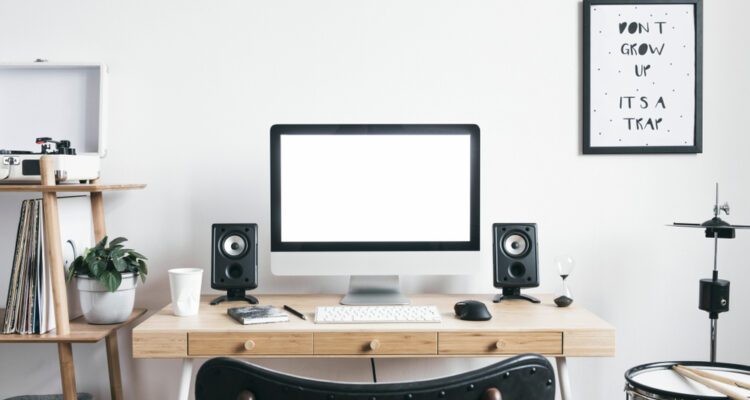
Working from home has transformed from occasional luxury to everyday reality for millions, making dedicated home office spaces essential rather than optional. A well-designed home office enhances productivity, separates professional life from domestic activities, and creates environments where focused work flourishes rather than competes with household distractions. Yet many people struggle with limited space, inadequate furniture, or poorly planned layouts that undermine efficiency whilst contributing to physical discomfort. Understanding effective home office design principles, selecting appropriate furniture, and optimising your workspace transforms challenging remote work into productive, comfortable experiences that support both professional success and personal wellbeing.
Why Proper Home Office Setup Matters
Makeshift workspaces at kitchen tables or bedroom corners prove unsustainable long-term solutions that compromise both work quality and home comfort. Poor ergonomics lead to neck pain, back problems, and repetitive strain injuries that plague remote workers lacking proper equipment. Inadequate separation between work and home life damages work-life balance, making it difficult to mentally disconnect from professional responsibilities.
Conversely, purposefully designed home offices enhance focus through dedicated environments free from domestic distractions. Proper furniture supports healthy posture during extended work sessions, whilst thoughtful layouts accommodate technology, storage, and workflow requirements efficiently. Investment in quality home office setup pays dividends through improved productivity, reduced health issues, and enhanced job satisfaction.
Essential Home Office Furniture
The Foundation: Selecting Your Desk
Your desk forms the cornerstone of any functional home office, determining workflow efficiency and available workspace for equipment, documents, and tasks. Size considerations prove crucial—compact desks suit small spaces but may prove cramped for multi-monitor setups or paperwork-intensive roles, whilst oversized desks overwhelm modest rooms.
Consider your work requirements when selecting desk configurations. Simple rectangular desks suit most applications, whilst L-shaped designs provide extensive surface area perfect for spreading out materials or separating computer work from writing tasks. Corner desks maximise awkward spaces, and adjustable height desks enable alternating between sitting and standing throughout the day.
Storage integration influences desk selection—built-in drawers organise supplies conveniently, though reduce leg room and limit furniture rearrangement flexibility. Minimalist designs with separate storage units offer versatility at the cost of convenience. Quality Home office desks balance aesthetic appeal with functional requirements, providing stable work surfaces that complement interior styles whilst meeting practical workspace needs.
Ergonomic Seating Solutions
Office chairs dramatically impact comfort and health during extended work sessions. Adjustable height, lumbar support, and armrests prove essential features preventing back pain and promoting healthy posture. Mesh backs provide breathability during warm weather, whilst padded designs offer comfort during long sessions.
Avoid cheap, non-adjustable chairs that force poor posture—back problems develop gradually but persist stubbornly. Quality ergonomic chairs represent worthy investments protecting long-term health whilst enhancing daily comfort.
Storage and Organisation
Effective storage prevents clutter accumulating whilst keeping essential items accessible. Filing cabinets accommodate paperwork systematically, bookcases display references and resources, and drawer units organise supplies preventing desk clutter. Consider both current requirements and anticipated growth—insufficient storage forces compromises as needs expand.
Vertical storage maximises limited floor space in compact home offices. Wall-mounted shelving, tall bookcases, and stacked storage units utilise height effectively without overwhelming rooms.
Space Planning and Layout Optimisation
Maximising Limited Spaces
Even modest rooms accommodate functional home offices through creative planning. Measure spaces carefully before purchasing furniture, ensuring adequate circulation whilst fitting essential items. Corner configurations utilise space efficiently, whilst wall-mounted folding desks provide workspace when needed without permanent floor space commitment.
Multi-functional furniture proves valuable in constrained spaces—desks with integrated storage, ottomans containing supplies, or Murphy desks that fold away when not in use all maximise versatility within limited square footage.
Natural Light and Positioning
Position desks near windows where possible, accessing natural light that reduces eye strain whilst improving mood and energy levels. However, avoid direct sunlight on screens creating glare and visibility issues. Perpendicular window positioning typically works well, providing ambient light without direct screen glare.
Supplement natural light with task lighting preventing eye strain during evening work or overcast days. Adjustable desk lamps enable directing light precisely where needed without creating screen reflections or shadows.
Technology Integration
Modern home offices demand robust technology infrastructure supporting connectivity, multiple devices, and power requirements. Ensure adequate electrical outlets near desk locations, using cable management solutions preventing tangled messes that look untidy whilst creating tripping hazards.
Consider internet connectivity when positioning desks—weak Wi-Fi signals in certain rooms hamper video calls and cloud-based work. Ethernet connections provide reliable alternatives where Wi-Fi proves problematic.
Creating Productive Work Environments
Minimising Distractions
Physical separation from household activity significantly improves focus. Dedicated rooms with doors provide ideal solutions, though room dividers, screens, or strategic furniture placement create psychological boundaries even in shared spaces.
Noise management proves equally important. Noise-cancelling headphones help concentration in busy households, whilst background music or white noise apps mask distracting sounds. Communicate boundaries with household members, establishing “do not disturb” periods for focused work.
Personalisation and Motivation
Whilst functionality proves paramount, aesthetics influence mood and motivation. Personal touches—artwork, plants, meaningful objects—create inspiring environments that feel pleasant rather than institutional. However, avoid excessive clutter that proves visually distracting or overwhelms modest spaces.
Colour psychology influences productivity—blues promote calm focus, whilst energising yellows and oranges stimulate creativity. Consider wall colours and accessories that support your work style and personal preferences.
Temperature and Air Quality
Comfortable temperature control proves essential for sustained focus. Position desks away from radiators causing overheating or draughty windows creating cold spots. Portable heaters or fans provide localised climate control in shared spaces where whole-room adjustments affect others.
Indoor plants improve air quality whilst adding visual interest. Spider plants, snake plants, and peace lilies thrive in typical indoor conditions whilst filtering airborne pollutants.
Budget Considerations and Value
Prioritising Essential Investments
Limited budgets demand strategic prioritisation. Invest most heavily in items affecting health and daily comfort—quality desks and chairs prove worthwhile even when requiring budget compromises elsewhere. Economise on decorative elements and storage solutions that can upgrade gradually as finances permit.
Consider both immediate costs and long-term value. Cheap furniture requiring replacement within years ultimately costs more than quality pieces serving decades. However, expensive designer furniture often proves unnecessary—functional, well-made mid-range options typically suffice for most home offices.
Phased Implementation
Complete home office setup need not occur simultaneously. Establish functional workspace with essential furniture first, then enhance gradually through accessories, storage upgrades, and aesthetic improvements. This phased approach spreads costs whilst allowing experimentation determining what genuinely improves your workspace versus marketing-driven purchases.
Maintaining Work-Life Balance
Physical Boundaries
Clear physical separation between work and home spaces proves psychologically valuable. When work occupies dedicated rooms or defined areas, leaving that space at day’s end creates mental boundaries between professional and personal time.
For those without separate rooms, ritual actions signal transitions—clearing desks, closing laptops, or covering equipment help mentally disconnect from work mode entering evening relaxation.
Establishing Routines
Consistent schedules maintain structure that home working easily undermines. Start and finish times, lunch breaks, and focused work periods create rhythms supporting productivity whilst preventing work bleeding endlessly into personal time.
Frequently Asked Questions
What’s the ideal desk size for a home office?
Desk dimensions depend on space availability and work requirements. Minimum practical sizes around 100cm wide by 60cm deep accommodate laptops and basic paperwork, whilst 140-160cm widths comfortably fit dual monitors and spreading materials. Measure your space and list essential items determining appropriate sizing.
How can I create a home office in a small flat?
Utilise vertical space through wall-mounted shelving and tall storage units. Consider compact desks, wall-mounted folding options, or repurposed furniture like console tables. Room dividers or screens create psychological separation even within shared spaces. Declutter ruthlessly, keeping only essential items in constrained workspaces.
Should I invest in a standing desk?
Standing desks benefit those experiencing back pain from prolonged sitting or seeking more active working styles. However, they cost significantly more than standard desks and require adjustment periods. Consider sit-stand converters that transform existing desks before committing to purpose-built standing desks.
How do I improve video call backgrounds?
Position cameras facing attractive, uncluttered backgrounds—bookcases, plain walls, or tasteful artwork work well. Ensure adequate lighting illuminating your face without creating harsh shadows. Virtual backgrounds provide alternatives, though require decent cameras and computers for convincing results.
What ergonomic features are most important?
Adjustable chair height aligning hips slightly above knees, lumbar support maintaining natural spine curve, monitor positioning at eye level preventing neck strain, and desk height allowing forearms parallel to floor whilst typing all prove crucial. Invest in quality chairs and consider monitor stands or laptop risers achieving proper heights.
Conclusion
Creating effective home office spaces requires thoughtful planning balancing functionality, comfort, and available space whilst respecting budget constraints. By selecting appropriate furniture, optimising layouts, managing technology requirements, and establishing boundaries between work and home life, remote workers build environments supporting productivity and wellbeing. Whether converting spare bedrooms into dedicated offices or carving workspaces from shared areas, strategic investments in quality furniture and mindful design transform home working from challenging necessity into comfortable, productive arrangement that serves professional success whilst enhancing overall quality of life.




Comments